I. Collecting experimental results
II. Writing the part of components of our proposed method
Friday, 8 August 2014

Estimate Homography to do 2D to 3D integration (18): Extract known points in pairs automatically
I. Writing codes to draw graphs of (x, y, t) and (X, Y, Z)
* Here, only shows the results of red color marker
* In each video type, 1st image shows (x, y, t), 2nd image shows (X, Y, Z)
- x, y: coordinates in 2D (... the position located on a Kinect frame)
- t: frame no.
- X, Y, Z: coordinates in 3D (... the position located in the World)
- Zoom:


- Viewpoint_change:


- Tilt:


- Real case 1:


- Real case 2:


* Here, only shows the results of red color marker
* In each video type, 1st image shows (x, y, t), 2nd image shows (X, Y, Z)
- x, y: coordinates in 2D (... the position located on a Kinect frame)
- t: frame no.
- X, Y, Z: coordinates in 3D (... the position located in the World)
- Zoom:
- Viewpoint_change:
- Tilt:
- Real case 1:
- Real case 2:
Thursday, 7 August 2014
Estimate Homography to do 2D to 3D integration (17): Extract known points in pairs automatically
I. Draft code for compute "Precision and Accuracy" of these 5 videos of demo:
[ Precision Part ]
* There are 8 rows in the picture marked "Precision". Each of them are corresponding to 1 color marker
* The order of these color markers are: yellow, red, blue, green
* Precision_2D_PPAF is related to the precision in 2D; Precision_3D_PPAF is related to 3D
[ Accuracy Part ]
* There are 4 rows of 2 "ans" in the picture marked "Accuracy". Each of them are corresponding to 1 color marker
* The order of these color markers are: yellow, red, blue, green
* nframes: total frames in that video which are used for experiments (including the 1st initial frames, but in the following computation, the 1st frame is not included)
* The information of accuracy_2D includes the following stuffs:
- 1 column: offset <= 3 pixels in 2D, after executing "2D-to-3D Re-projection" computation
- 2 column: offset <= 5 pixels
- 3 column: offset <= 8 pixels
- 4 column: offset <= 10 pixels
- 5 column: offset <= 15 pixelsi
- 6 column: offset <= 20 pixels
- 7 column: offset > 20 pixels
- Zoom:
- Viewpoint_change:
- Tilt:
- Real case 2:
- Real case 3:
[ Precision Part ]
* There are 8 rows in the picture marked "Precision". Each of them are corresponding to 1 color marker
* The order of these color markers are: yellow, red, blue, green
* Precision_2D_PPAF is related to the precision in 2D; Precision_3D_PPAF is related to 3D
[ Accuracy Part ]
* There are 4 rows of 2 "ans" in the picture marked "Accuracy". Each of them are corresponding to 1 color marker
* The order of these color markers are: yellow, red, blue, green
* nframes: total frames in that video which are used for experiments (including the 1st initial frames, but in the following computation, the 1st frame is not included)
* The information of accuracy_2D includes the following stuffs:
- 1 column: offset <= 3 pixels in 2D, after executing "2D-to-3D Re-projection" computation
- 2 column: offset <= 5 pixels
- 3 column: offset <= 8 pixels
- 4 column: offset <= 10 pixels
- 5 column: offset <= 15 pixelsi
- 6 column: offset <= 20 pixels
- 7 column: offset > 20 pixels
- Zoom:
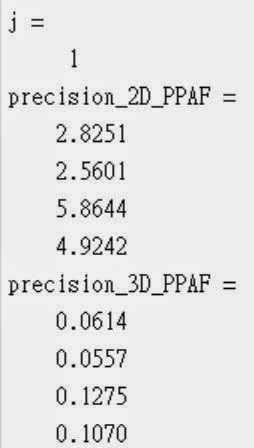 |
| Precision: 1st 4 values of ans are in 2D, 2nd 4 values of ans are in 3D |
 |
| Accuracy: offset of 4 color markers [ <=3 pixels | <=5 pixels | <=8 pixels | <=10 pixels | <=15 pixels | <=20 pixels | >20 pixels ] |
- Viewpoint_change:
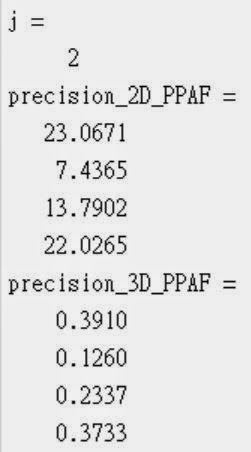 |
| Precision: 1st 4 values of ans are in 2D, 2nd 4 values of ans are in 3D |
 |
| Accuracy: offset of 4 color markers [ <=3 pixels | <=5 pixels | <=8 pixels | <=10 pixels | <=15 pixels | <=20 pixels | >20 pixels ] |
- Tilt:
 |
| Precision: 1st 4 values of ans are in 2D, 2nd 4 values of ans are in 3D |
 |
| Accuracy: offset of 4 color markers [ <=3 pixels | <=5 pixels | <=8 pixels | <=10 pixels | <=15 pixels | <=20 pixels | >20 pixels ] |
- Real case 2:
 |
| Precision: 1st 4 values of ans are in 2D, 2nd 4 values of ans are in 3D |
 |
| Accuracy: offset of 4 color markers [ <=3 pixels | <=5 pixels | <=8 pixels | <=10 pixels | <=15 pixels | <=20 pixels | >20 pixels ] |
- Real case 3:
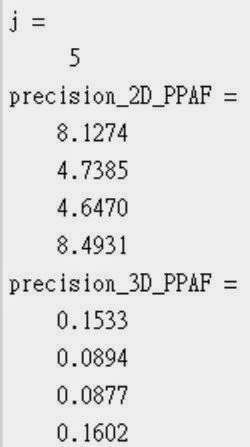 |
| Precision: 1st 4 values of ans are in 2D, 2nd 4 values of ans are in 3D |
 |
| Accuracy: offset of 4 color markers [ <=3 pixels | <=5 pixels | <=8 pixels | <=10 pixels | <=15 pixels | <=20 pixels | >20 pixels ] |
Wednesday, 6 August 2014
Estimate Homography to do 2D to 3D integration (16): Extract known points in pairs automatically
I. Extract frames from recorded videos:
- These are for final presentation
- zoom:
- viewpoint_change:
- tilt:
- real case 1:
- real case 2:
- These are for final presentation
- zoom:
- viewpoint_change:
- tilt:
- real case 1:
- real case 2:
Tuesday, 5 August 2014
Estimate Homography to do 2D to 3D integration (15): Extract known points in pairs automatically
I. Part of Demo of "real-case"
II. Need to assign the possession points onto these 2 real-case videos, or manually mark these possession points via my GUI
- Info of possession points of real-case-1:

- Info of possession points of real-case-2:

II. Need to assign the possession points onto these 2 real-case videos, or manually mark these possession points via my GUI
- Info of possession points of real-case-1:
- Info of possession points of real-case-2:
Monday, 4 August 2014
Estimate Homography to do 2D to 3D integration (14): Extract known points in pairs automatically
I. Find the limitation of my proposed system by collecting real-cases for demo:
- The brightness of the environment causes unstable result of color recognition from Particle Filter Method
- Not powerful enough to do "look at the color markers, and look to other place, then look to the color markers again" process: not as stable as using the Webcam (...Eye-tracker shows lower brightness of color comparing to Webcam in the extracted video frames)
II. The frame rate of Webcam is not a constant value; instead of using a Webcam, adapting Eye-Tracker to do every experiments...
- Figure out how to make two videos (one from Kinect, another from eye-tracker) can play simultaneously: Frame Rate is the hint
- Kinect: 30 FPS, Eye-Tracker: 24FPS
- Here is the way to do:

III. Part of experimental results for final demo
- Zoom, Tilt, Viewpoint_Change
- The brightness of the environment causes unstable result of color recognition from Particle Filter Method
- Not powerful enough to do "look at the color markers, and look to other place, then look to the color markers again" process: not as stable as using the Webcam (...Eye-tracker shows lower brightness of color comparing to Webcam in the extracted video frames)
II. The frame rate of Webcam is not a constant value; instead of using a Webcam, adapting Eye-Tracker to do every experiments...
- Figure out how to make two videos (one from Kinect, another from eye-tracker) can play simultaneously: Frame Rate is the hint
- Kinect: 30 FPS, Eye-Tracker: 24FPS
- Here is the way to do:
III. Part of experimental results for final demo
- Zoom, Tilt, Viewpoint_Change
Friday, 1 August 2014
Draft Master Thesis (2)
I. Survey relevant references:
- Particle Filter
- EPnP
- Ray Tracing
- Camera Calibration
- Similar work to mine
II. Modified previous "document of literature review"
III. Writing Thesis
- Particle Filter
- EPnP
- Ray Tracing
- Camera Calibration
- Similar work to mine
II. Modified previous "document of literature review"
III. Writing Thesis
Subscribe to:
Posts (Atom)